
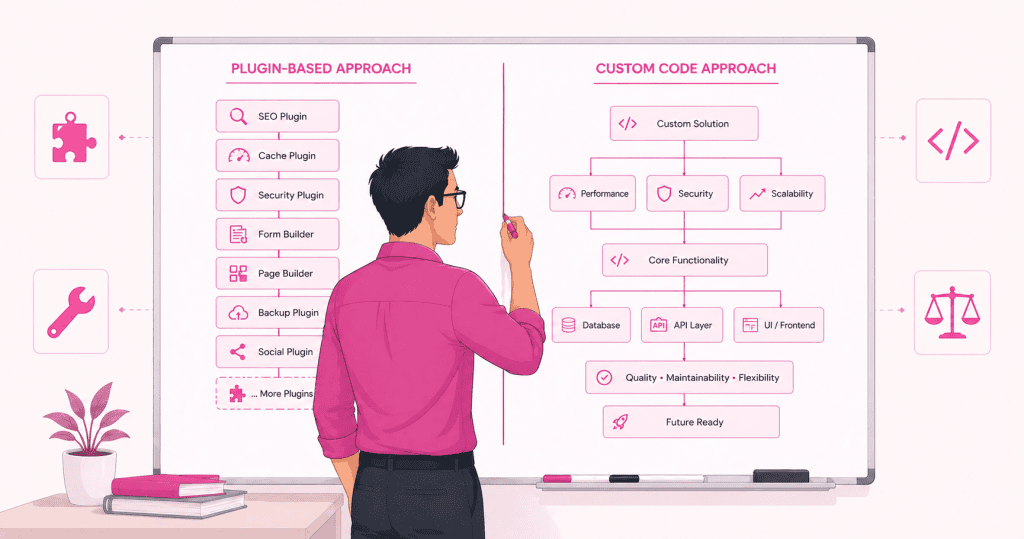
One of the more consequential decisions in any WordPress build is how much to rely on plugins versus how much to build from scratch. Get it right and the site is maintainable, performant, and extensible. Get it wrong and you end up either over-engineered for what the site actually needs, or locked into a plugin stack that grows more fragile with every update cycle.
The honest answer is that neither approach is universally better. Plugins are the right tool in many situations. Custom development is the right tool in others. The skill is in knowing which is which, and that judgment depends on factors that are specific to each project rather than general preferences about how WordPress should be built.
When Plugins Are the Right Choice
Plugins exist because most WordPress functionality requirements are not unique. Contact forms, SEO metadata, image optimisation, caching, backup scheduling, e-commerce. These are solved problems. A well-maintained plugin that handles a solved problem is almost always preferable to writing custom code that does the same thing.
Established Functionality With Active Maintenance
The strongest case for a plugin is when the requirement maps cleanly onto what the plugin was designed to do, the plugin is actively maintained by a credible developer or team, and the plugin has a large enough user base that compatibility issues surface and get resolved quickly.
A plugin meeting those criteria is not just convenient. It is carrying the maintenance burden of that feature on behalf of every site that uses it. Security patches get applied, WordPress core compatibility gets updated, and edge cases get resolved through a development cycle that no single site owner could fund independently. Using that plugin is a rational decision.
Speed of Implementation on Standard Requirements
For projects with standard requirements and constrained budgets or timelines, plugins are often the only realistic path. A custom-built form system with conditional logic, file uploads, and notification routing takes significant development time. A plugin that handles all of that in an afternoon is not a compromise. It is an appropriate allocation of resources for what the project actually needs.
The question worth asking is whether the requirement is genuinely standard. If the answer is yes, reaching for a proven plugin is usually the right call.
When the Ecosystem Already Has a Clear Leader
In several WordPress functional categories, one plugin has become the de facto standard to a degree that makes alternatives difficult to justify. WooCommerce for e-commerce. Yoast or Rank Math for SEO. Gravity Forms or WS Form for complex forms. These tools have extensive documentation, large communities, and deep integration with the broader ecosystem. The cost of not using them is not just development time. It is the loss of all the third-party integrations, tutorials, and community support built around them.
When Custom Development Makes More Sense
Custom development is not about preference or technical pride. It is about situations where the plugin approach introduces more problems than it solves, where the requirement is specific enough that no plugin fits cleanly, or where the long-term cost of maintaining a plugin-dependent solution exceeds the upfront cost of building something properly.
Requirements That Do Not Map to Any Plugin Cleanly
When a site’s functional requirement is genuinely unusual, the temptation is to find the closest available plugin and configure it until it approximates the need. This works sometimes. More often it produces a configuration that is brittle, hard to document, and dependent on the plugin author making decisions that continue to align with your use case.
A custom solution built to the exact requirement is simpler to understand, easier to maintain, and not subject to the decisions of a third party. The upfront cost is higher. The long-term maintenance cost is often lower, because there is no plugin update cycle to manage and no risk of a version change breaking the implementation.
Performance-Sensitive Functionality
Plugins are general-purpose by design. They handle more cases than any individual site needs, and that breadth comes with overhead. A plugin that provides ten features when you need one is still loading the code for all ten, registering hooks for all ten, and adding to the request lifecycle for all ten.
For functionality that sits in the critical path of every page load, custom code that does exactly what is needed and nothing else is often meaningfully faster. This is particularly relevant for anything that runs on every request, such as custom post type queries, dynamic content rendering, or API integrations that feed front-end output.
When Long-Term Maintainability Is the Priority
A plugin-heavy site is dependent on the continued health of multiple third-party development efforts simultaneously. Each plugin in the stack is a relationship with an external maintainer. When that maintainer stops updating the plugin, changes the pricing model, sells the product to a new owner, or makes breaking architectural changes, the site inherits that problem.
Custom code has different risks but more predictable ones. It does not update on its own, which means it does not break on its own. It requires maintenance when WordPress core changes affect it, but that maintenance is scoped and understandable. For sites that need to remain stable and maintainable over a five or ten year horizon, reducing external dependencies through targeted custom development is a deliberate risk management decision.
Custom Code Also Carries Responsibility
Choosing custom development does not automatically mean choosing the safer path. Poor custom code can be worse than a well-maintained plugin. It can introduce security vulnerabilities, break during PHP version upgrades, produce slow database queries, or become completely opaque to the next developer who inherits the site.
This is why custom work requires discipline. Code should be placed correctly, documented sufficiently, and written to WordPress standards rather than as a collection of shortcuts. Forms need sanitization and nonce verification. Admin tools need capability checks. A feature that works today but that nobody can safely modify in eighteen months has solved one problem while creating another. Custom development earns its place when it genuinely simplifies the system. When it only adds another layer that requires explanation, the plugin it was meant to replace may have been the better choice.
The Hybrid Reality of Most Production Sites
In practice, almost every well-built WordPress site uses both approaches. The question is never really plugins versus custom development. It is where to draw the line between them on this particular project.
A sensible working principle is to use plugins for established, well-maintained functionality in categories where the plugin approach is proven, and to write custom code for the parts of the site that are genuinely specific to the business, the workflow, or the performance requirement.
That line sits in a different place depending on the project. A simple marketing site may need no custom code at all beyond basic configuration. A platform with complex membership logic, custom content types, and specific integration requirements may need a substantial amount of custom development alongside a carefully selected set of core plugins.
Evaluating the Plugin Stack Honestly
When reviewing a plugin stack, the relevant questions are not just whether each plugin works. They are whether each plugin is actively maintained, whether it is doing something a different plugin is already doing, whether it is adding overhead that the site does not need, and whether the total stack is something a new developer could reasonably understand and maintain.
A stack that passes those questions is a defensible one. A stack that fails several of them is accumulating risk regardless of whether it is currently functional.
Editing Experience Is Part of the Decision
The right technical choice has to account for who manages the site day to day, not just who builds it. A feature that is technically sound but difficult for editors to use creates a different kind of problem. So does a plugin that gives editors too much uncontrolled freedom over layout and design, which tends to produce inconsistency over time.
A team section built with a page builder may be adequate when the business has a handful of people who rarely change. When the business has many staff members, departments, role filters, and individual profile pages, a structured custom post type with defined fields is easier for editors to manage and more stable for the developer to maintain. WordPress works best when it is treated as a content system, where the right people can edit the right things without depending on a developer for every small update, and without breaking the layout in the process.
The Decision Framework
The most useful way to approach this decision on any new project is to start with the requirement, not the tool. Define what the site needs to do. Identify whether that requirement is standard or specific. Assess whether a plugin exists that fits cleanly without over-engineering the implementation. If it does, use it. If it does not, build it.
That framing keeps the decision honest. It avoids the reflexive plugin-first approach that produces bloated stacks, and it avoids the reflexive custom-first approach that produces over-engineered sites with maintenance costs that are hard to justify.
It is also worth factoring in replacement cost. If a plugin or custom feature needs to be swapped out later, how difficult will that be? A solution that locks the site into a particular structure unnecessarily is carrying hidden cost from day one. Good decisions leave the future manageable, not just the present functional.
The goal is a site that works, performs, and can be maintained by someone who was not involved in building it. Both plugins and custom code can serve that goal. The judgment is in knowing when each one does.
If your WordPress site depends on too many plugins or you are not sure whether a feature should be custom-built, WPFellow can help review the current setup and recommend a cleaner path forward. Get in touch to discuss your project.



