
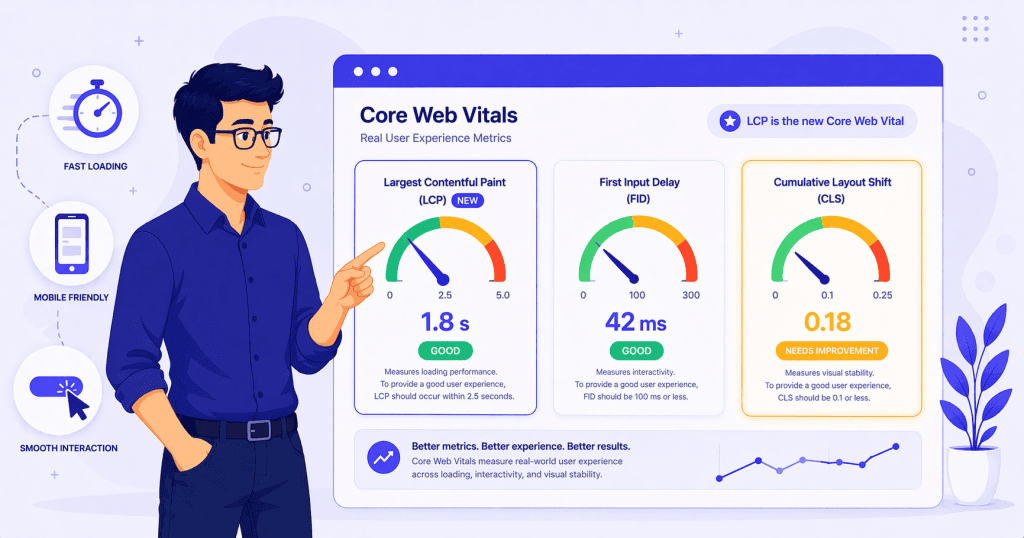
Core Web Vitals have been part of Google’s ranking signals since 2021, but they are not static. Google updates the metrics over time, and the most significant change in recent years happened in March 2024 when the responsiveness metric was replaced entirely.
If you are running a WordPress site and you have not looked at your Core Web Vitals since the early days, the landscape has shifted. The metrics still measure loading speed, interactivity, and visual stability, but how interactivity is measured has changed in ways that affect WordPress sites more than most.
A Quick Overview of the Three Metrics
Core Web Vitals are three specific measurements, each focused on a different aspect of how a visitor experiences your site.
Largest Contentful Paint (LCP)
LCP measures how long it takes for the largest visible content element on the page to finish loading. This is usually a hero image, a large heading, or a prominent block of text. A good LCP score is under 2.5 seconds.
Cumulative Layout Shift (CLS)
CLS measures visual stability. It tracks how much the page layout shifts unexpectedly while it loads. Images without defined dimensions, ads that push content down, and fonts that swap after the page renders are common causes. A good CLS score is under 0.1.
Interaction to Next Paint (INP)
INP is the new metric. It replaced First Input Delay (FID) in March 2024, and it is the change that matters most for WordPress site owners. A good INP score is 200 milliseconds or less.
What Changed and Why It Matters
What FID Measured
First Input Delay only measured the time between a user’s first interaction, such as clicking a button or tapping a link, and when the browser started processing that interaction. It was a single measurement of the first thing that happened.
The problem with FID was that most sites passed it easily. A page could respond quickly to the first click but become sluggish on every interaction after that, and FID would still report a good score. It only captured the initial impression, not the ongoing experience.
What INP Measures Instead
INP measures the responsiveness of the page across every interaction a user makes during their entire visit. Every click, tap, and key press is tracked. INP reports the slowest interaction at the 75th percentile, which means it captures the experience of the vast majority of users, not just the best case.
This is a fundamentally stricter test. A site that loads quickly but becomes unresponsive when someone opens a dropdown menu, interacts with a form, or clicks through a product filter will now show a poor INP score even if the initial load was fast.
For WooCommerce stores, this is especially relevant. Product filtering, adding items to cart, applying discount codes, and navigating checkout steps are all interactions that INP now measures. A store that feels fast on the homepage but sluggish during the actual shopping experience will see that reflected in its scores.
Why This Hit WordPress Sites Harder
When INP replaced FID, roughly a 5 percentage point drop in mobile Core Web Vitals pass rates was observed across the web. WordPress sites were disproportionately affected because they tend to carry more JavaScript than leaner platforms, and much of that JavaScript runs on the main browser thread where it competes with user interactions.
Page builders, plugin scripts, analytics tags, chat widgets, and consent banners all contribute to main thread congestion. A typical WordPress site with a page builder, several active plugins, and a few third-party embeds can easily have enough JavaScript running to push INP past the 200ms threshold on mobile devices.
WordPress as a platform has also been noted as lagging behind competitors like Shopify and Wix in mobile Core Web Vitals pass rates. This is not because WordPress is inherently slower, but because the flexibility that makes WordPress powerful also means there is more room for unoptimized configurations. A well-built WordPress site can score excellently. A site assembled without attention to front-end performance often will not.
What Typically Causes Poor INP on WordPress Sites
INP problems on WordPress sites usually come from a small number of recurring sources.
Heavy Page Builder Output
Page builders generate the front-end markup and JavaScript that powers the layouts they create. Some builders produce cleaner, lighter output than others. Builders that rely heavily on JavaScript for layout rendering, animations, or interactive elements add work to the main thread that directly affects INP.
This does not mean page builders are inherently bad for performance. It means the choice of builder and how it is configured has a real impact on responsiveness, and that impact is now measured by INP in a way that FID never captured.
Plugin Scripts Loading Globally
Many WordPress plugins load their JavaScript and CSS on every page of the site, regardless of whether their functionality is needed on that specific page. A form plugin loading its scripts on pages with no forms. A slider plugin loading assets on pages with no sliders. Each one adds to the total JavaScript the browser must parse and execute.
This global script loading is one of the most common and most fixable INP contributors on WordPress sites. Limiting where plugin assets load, either through plugin settings or through asset management tools, can produce meaningful improvements.
Third-Party Scripts
Analytics tags, advertising scripts, chat widgets, social media embeds, and consent management platforms all run JavaScript that competes for the main thread. On mobile devices with less processing power, these scripts can delay the browser’s ability to respond to user input noticeably.
The challenge with third-party scripts is that they are often loaded early, run frequently, and are outside the site owner’s direct control in terms of how efficiently they execute. A consent banner that initializes before the page is interactive, or an analytics script that fires on every user action, can add enough latency to push INP past the threshold on slower devices.
Deferring non-essential third-party scripts, loading them after the page has become interactive, or replacing heavy implementations with lighter alternatives are all practical steps. But the first step is knowing which scripts are actually running and how much main thread time they consume.
What This Means for WordPress Site Owners
The shift from FID to INP means that front-end interaction quality now matters more than it used to in measurable terms. A site that loads quickly but feels sluggish when someone clicks through it has a problem that Google now quantifies.
Lab Scores Are Not the Whole Picture
Tools like PageSpeed Insights show both lab data (simulated tests) and field data (real user measurements from Chrome). INP is a field metric. It reflects what actual visitors experience on their devices and connections. A lab test on a fast desktop might show no issues while real mobile visitors on mid-range phones experience noticeable delays.
This is why checking field data in Google Search Console or PageSpeed Insights is more informative for INP than running a single lab test and assuming the score applies to everyone.
Do Not Chase Scores Blindly
A perfect INP score is not necessary for a good user experience or strong search performance. The goal is to be under 200ms at the 75th percentile, which means the vast majority of interactions should feel responsive. Spending significant effort to move from 150ms to 80ms is unlikely to produce meaningful returns.
The practical priority is to identify and fix the obvious problems first: heavy JavaScript that blocks the main thread, scripts loading where they are not needed, and third-party tags that run without restraint. These fixes tend to improve the experience noticeably for visitors, which is the actual point.
Conclusion
Core Web Vitals still measure the same three dimensions of user experience: loading speed, visual stability, and interactivity. But the way interactivity is measured has gotten significantly stricter with INP replacing FID.
For WordPress sites, this means paying closer attention to how JavaScript is managed, what scripts load where, and how the front end performs under real-world conditions on real devices. The sites that do well are the ones where someone has looked at the full interaction experience, not just the initial page load.
If your WordPress site is struggling with Core Web Vitals or you want a clear picture of what is affecting real-world performance, WPFellow’s WordPress Speed Optimization service includes a full diagnostic review covering LCP, INP, and CLS with practical recommendations.



