
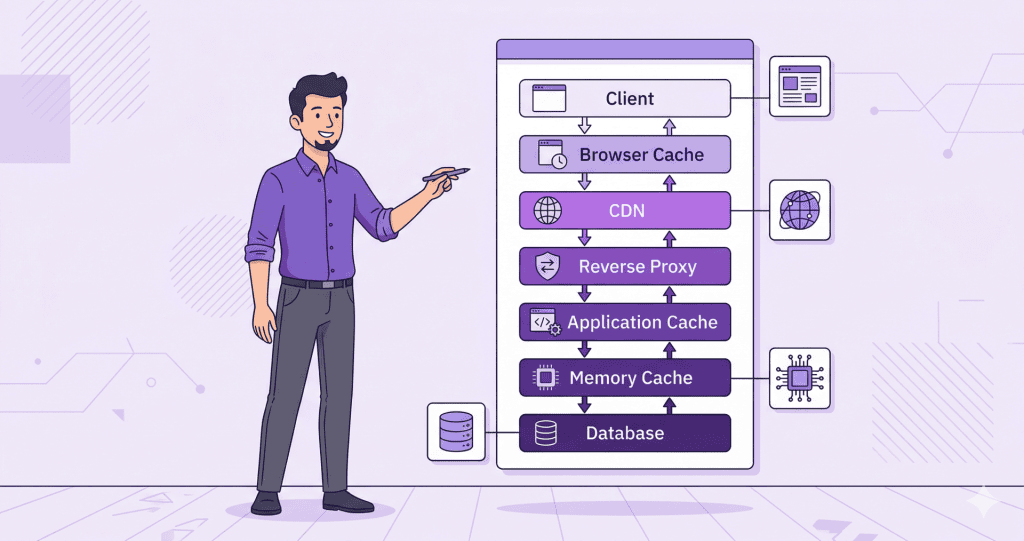
Caching is one of those topics that gets recommended constantly and explained poorly. Install a caching plugin, the advice usually goes, and your site will be faster. Sometimes that is true. Often it is incomplete. And occasionally a poorly configured caching setup creates more problems than it solves.
This is a clear explanation of what caching actually does, what the different types are, and where things tend to go wrong on WordPress sites.
What Caching Is Actually Doing
Every time someone visits a WordPress page, the server normally runs a sequence of operations. It queries the database, processes PHP, assembles the HTML, and sends it to the browser. That sequence takes time, and it repeats for every visitor on every page load.
Caching interrupts that cycle by storing a ready-made version of the output. When the next visitor arrives, the server serves the stored version instead of rebuilding it from scratch. The result is a faster response, and less load on the server.
That is the core idea. The complexity comes from the fact that there are several different layers where caching can happen, and each one works differently.
Page Caching
Page caching is what most people mean when they talk about a caching plugin. It stores the full HTML output of a page so that subsequent requests can skip the PHP and database work entirely.
For most WordPress sites, page caching is the highest-impact layer. A page that previously required forty database queries and a full PHP render cycle can be served as a static HTML file in a fraction of the time.
The limitation is that page caching does not work well for pages that are personalised or dynamic. A logged-in user, a WooCommerce cart page, or a page with content that changes per visitor cannot be served from a static cache without serving the wrong content to the wrong person. Caching plugins handle this by excluding certain pages and cookies from the cache, and getting that configuration right matters.
Object Caching
Object caching works at a different level. Instead of storing the full HTML output, it stores the results of individual database queries and PHP operations in memory so they can be reused within the same page load or across multiple requests.
WordPress has a built-in object cache, but by default it only persists for the duration of a single request. To make it persistent across requests, a backend like Redis or Memcached needs to be in place on the server.
On a site with complex queries, a membership system, or a WooCommerce store with many products, a persistent object cache can meaningfully reduce database load. On a simple brochure site it is less impactful, but it is rarely harmful when configured correctly.
CDN Caching
A content delivery network stores copies of static assets, images, CSS, JavaScript, and sometimes full pages, on servers distributed across different geographic locations. When a visitor loads the site, those assets are served from the location closest to them rather than from the origin server.
CDN caching primarily helps with the delivery of assets rather than the generation of pages. It reduces latency for visitors who are geographically distant from the hosting server and offloads static file requests from the origin entirely.
Some CDNs also offer full-page caching at the edge, which can be very effective but requires careful configuration to avoid serving cached versions of pages that should be dynamic.
Where Caching Goes Wrong
The most common caching problem is stale content. A page is updated, but visitors continue seeing the old cached version because the cache has not been cleared. Most caching plugins handle this automatically when a post is saved, but edge cases exist, particularly with third-party CDNs or when multiple caching layers are active simultaneously.
Conflicts between caching layers are also common. A site running a caching plugin, a CDN with its own caching rules, and hosting-level caching from a managed host can end up with three systems making independent decisions about what to serve and when. When something looks wrong, diagnosing which layer is responsible takes more effort than it should.
For WooCommerce sites, misconfigured caching can lead to cart contents being shared between users or checkout pages being served from cache, both of which are serious problems that require careful exclusion rules to prevent.
Caching done well is invisible. Caching done poorly surfaces as strange behaviour that is difficult to reproduce and harder to explain to a client.
What This Means in Practice
A caching plugin is a starting point, not a complete solution. The right configuration depends on the hosting environment, whether a CDN is in use, how dynamic the site is, and what other plugins are running. Getting these layers working together cleanly is worth more than any single plugin setting.
If your site has caching in place but is still slow, or is showing inconsistent behaviour that clears up when the cache is flushed, the configuration is worth a closer look. WordPress Speed Optimization from WPFellow covers the full picture, including how caching fits into the broader performance setup of the site.



